lundi 27 août 2018

Use the Power of AI to Learn a New Language with Mondly

Learning a new language is one of the best things you can do to keep your brain active and healthy. It also makes traveling to your favorite foreign destination far more enjoyable. But most people who try learning a new language give up far too soon, since the most popular language-learning platforms rely on antiquated techniques that utilize monotonous and boring word repetition.

Mondly offers a far more efficient and enjoyable path to learning a new language, and a lifetime subscription is available for over 90% off at $69.99.

Mondly's revolutionary approach to language education uses state-of-the-art speech recognition technology to listen to your words and phrases and offers positive feedback if you're on the right track. This means you can focus on your weak spots without wasting time going over the elements of the language you've already mastered.

You'll also benefit from Mondly's growing roster of professional voice actors, a verb conjugator, and recorded conversations between native speakers in the language of your choice.

Your lifetime subscription lets you choose five languages from a sweeping list of options that includes English, Afrikaans, Arabic, French, German, Hebrew, Japanese, and more.

Don't give up on learning your dream language. A lifetime subscription to Mondly is available for just $69.99—over 90% off its usual price.


from xda-developers https://ift.tt/2NjEB2e
via IFTTT

Xiaomi Pocophone F1 launches globally in 65 countries

Xiaomi Pocophone F1, Xiaomi Poco F1

The Xiaomi Pocophone F1 definitely turned some heads of enthusiasts and regular customers. The reason is this sub-$300 phone has some top of the line specs, like Snapdragon 845, 6GB/8GB RAM, 64/128/256GB internal storage, 4,000 mAh battery, and a lot more. Some even called it the OnePlus killer as it's more affordable. Xiaomi Poco F1 launched in India on the 22nd of August. Today, Xiaomi announced the global availability of the device, in a total of 65 countries.

Unfortunately, for some of the readers, the Pocophone will not be available in the US or Canada. Liliputing was kind enough to provide the price of the phone in different markets. Even though some of them are about 25% more expensive than the original price, Poco F1 still keeps the spot in the sub-300 market. Here is the price breakdown in different markets:

  • €329 (~$380) and up in France
  • 2,800 (~$360) HKD and up in Hong Kong
  • 17,990 PHP (~340) and up in the Philippines
  • 4,499,000 IDR (~$310) and up in Indonesia
  • 1,237 MYR ($~300) and up in Malaysia

If you're interested in the country availability, the POCOPHONE Global Twitter account posted it earlier today. As you see from the photo below, US and Canada didn't get any love. This is not the first time for the Chinese manufacturer to leave them out, whether it's their choice or not.

Xiaomi Poco F1 ticks a lot of boxes for a lot of people. The phone features the latest top of the line specs, wide availability, affordable price tag, and lot more. But, as many phones in 2018, it's not perfect. It has a big notch and lacks NFC and OIS. These features are rarely used in developing countries like India and others, so that's probably why Xiaomi cheaped out on them.

Still, if you're looking for a device that looks and feels like a flagship, but has a very low price, the Xiaomi Pocophone F1 is a hard to beat option.


Source: POCOPHONE Global


from xda-developers https://ift.tt/2wuTZSl
via IFTTT

Google Pixel 3 may be officially unveiled on October 9th

Google Pixel 3 XL Clearly White

While pretty much everything about the Pixel 3 XL is out in the open, we don't actually know when it (or its smaller variant) will be announced. Many assumed that for the third year in a row we'd be seeing an October 4th launch, but a report from Bloomberg actually suggests that to be incorrect. According to the report, Google intends to launch the new Google Pixel devices at a media event in New York City on October 9th. Previously, the Pixel devices were launched in San Francisco.

Given that it's Bloomberg, there's no real reason to doubt the report. That's not all we expect to see announced at the time, either. According to WinFuture, we could well be seeing the introduction of not one, not two, but three new Google Pixel smartwatches. Interestingly, they're set to launch only a short while after the next Snapdragon Wear OS chip is set to release as well. Alongside those as well, notable leaker Evleaks has said that we may also see the introduction of a Pixelbook 2018 edition. While we don't know a lot about the Pixelbook launching this year, we can make some guesses as to what its specifications may be.

With the cat out of the bag in terms of everything related to the Google Pixel 3 XL, it's not as if the company can really give us any more surprises. Obviously, the smaller Pixel 3 hasn't been leaked anywhere yet, but it's expected like always to be the same specs – just smaller. The change of location from San Francisco to New York is sort of interesting, along with the change of launch date from previous years. We'll be keeping an eye out to see if any other information regarding the new Pixels comes up, and we'll be sure to let you know.


Source: Bloomberg


from xda-developers https://ift.tt/2ogbFgK
via IFTTT

Win a OnePlus 6 from RhinoShield

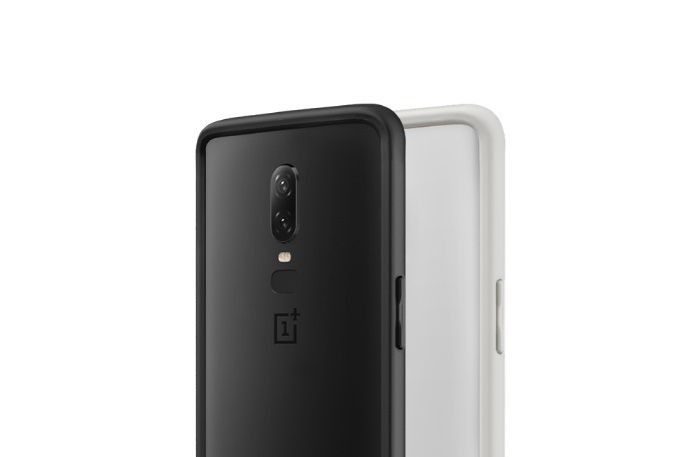
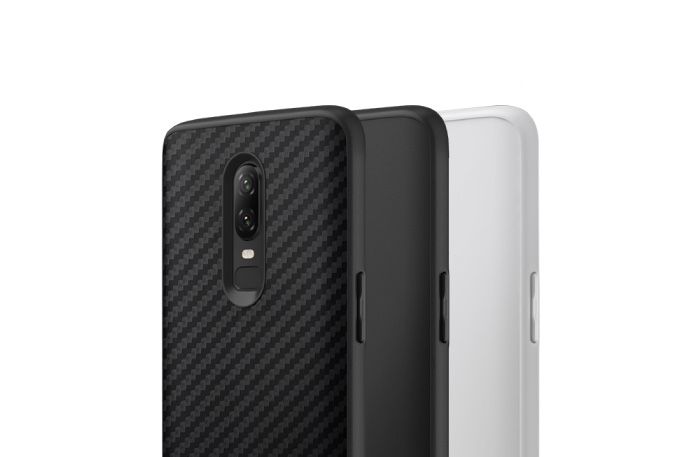
RhinoShield is teaming up with XDA to offer our readers a chance to win a new OnePlus 6 phone. RhinoShield is heavily focused on offering the best protective solutions for the OnePlus 6 with their SolidSuit, CrashGuard, and Screen Protector products. We recently got a hands-on look at their product line-up that you can check out here.

Win a OnePlus 6 from RhinoShield!

CrashGuard Bumper for OnePlus 6

SolidSuit Case for OnePlus 6


Shop RhinoShield
We thank RhinoShield for sponsoring this post. Our sponsors help us pay for the many costs associated with running XDA, including server costs, full time developers, news writers, and much more. While you might see sponsored content (which will always be labeled as such) alongside Portal content, the Portal team is in no way responsible for these posts. Sponsored content, advertising and XDA Depot are managed by a separate team entirely. XDA will never compromise its journalistic integrity by accepting money to write favorably about a company, or alter our opinions or views in any way. Our opinion cannot be bought.


from xda-developers https://ift.tt/2PJup4X
via IFTTT

How to remap Bixby 2.0 on the Samsung Galaxy Note 9

Samsung Galaxy Note 9 Bixby 2.0

Samsung released Bixby 2.0 with the Samsung Galaxy Note 9. Bixby 2.0 made promises of being way better than Bixby 1.0 which launched last year with the Samsung Galaxy S8 and Galaxy S8+. I have been using the Samsung Galaxy Note 9 for a few days and in my view, Bixby 2.0 is basically the same as 1.0 but missing some features I liked. So like any sane human being, I found a way to remap it. Below are instructions on how to install and use the two best remapping apps for Bixby 2.0 on the Galaxy Note 9.

Remap Bixby 2.0 on the Samsung Galaxy Note 9

Option 1: Button Mapper

Button Mapper: Remap your keys (Free+, Google Play) →

Button Mapper lets you remap any button on your phone, but specifically for our purposes, it lets you remap the Bixby button on the Galaxy Note 9. This app is more reliable than option two, but it does have one downside. You need to run the script every time you reboot your phone. You can follow the tutorial below to set it up.

  1. Install Button Mapper from the Google Play Store.
  2. Set up ADB on your computer. You can follow this guide to get it installed.
  3. Enable ADB by going to Settings > About Phone > Software Information and tap build number 7 times. Once you do this enter your password and go back twice. You can enter the developer options menu now. Just toggle the USB Debugging switch to enable ADB.
  4. Open the Button Mapper app, at the bottom of the window, there will be a popup asking you to enable accessibility services. You then just enable accessibility services for Button Mapper.
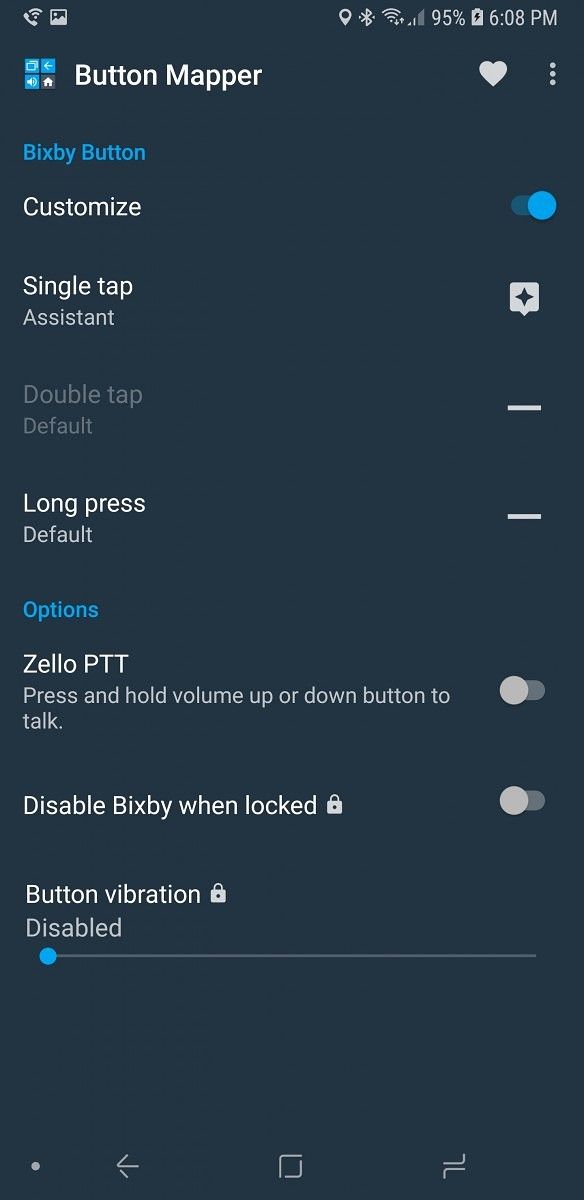
  5. Select the Bixby Button option at the top of the app. Then click the customize button. Once you do this you will need to run the following commands:
      adb shell sh /data/data/flar2.homebutton/keyevent.sh  

    And then

      adb shell sh /data/data/flar2.homebutton/keyevent.sh -d  
  6. You will need to run this second command every time you reboot your phone. This will also disable Bixby Voice. If you don't disable Bixby Voice, it will open every time you press the button along with what you have it remapped to. You can re-enable Bixby Voice with the following command:
      adb shell sh /data/data/flar2.homebutton/keyevent.sh -e.  
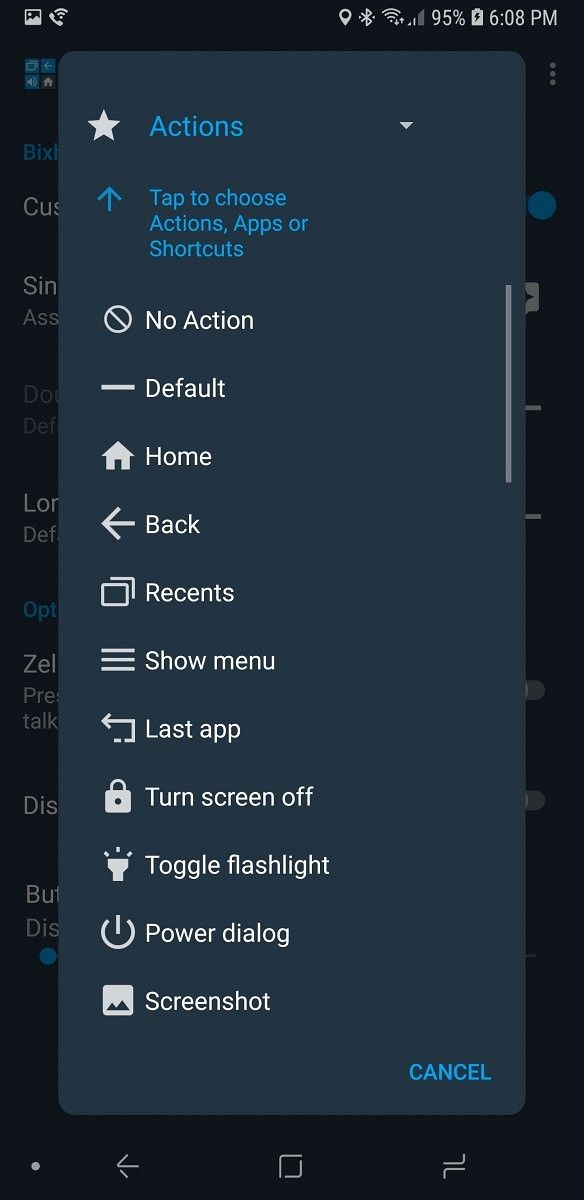
  7. You select whatever option you want to use in the single tap and long press menus. You can set it to do things like open Google Assistant or toggle the flashlight. Remap Bixby 2.0 on the Samsung Galaxy Note 9 Remap Bixby 2.0 on the Samsung Galaxy Note 9

This app seems to be a bit better in use because it disables Bixby Voice and remaps it. The downside is that you will have to run the ADB command every time you reboot your phone. If you don't want to have to run the command every time you reboot your phone, option 2 will be for you.

Option 2: bxActions

bxActions - Bix Button Remapper (Free+, Google Play) →

bxActions is an app that has been doing Bixby remapping since the Samsung Galaxy S8 and Samsung Galaxy S8+ launched last year. This app is pretty reliable for remapping Bixby on the Samsung Galaxy Note 9, but Bixby Voice is still installed so there could be some compatibility issues with that. The developer is actively developing the app so if you do find any bugs, you should expect them to be fixed.

  1. Join the open beta for bxActions then install the app.
  2. Install ADB on your computer. You can follow this guide to get it installed.
  3. Enable ADB by going to Settings > About Phone > Software Information and tap build number 7 times. Once you do this enter your password and go back twice. You can enter the developer options menu now. Just toggle the USB debugging switch to enable ADB.
  4. Open bxActions and follow the prompts to give it the permissions it needs.
  5. Select the Bix button options and click the red box that says "please unlock permissions using a PC"
  6. Run the two commands:
      adb shell pm grant com.jamworks.bxactions android.permission.WRITE_SECURE_SETTINGS  adb shell pm grant com.jamworks.bxactions android.permission.READ_LOGS  
  7. Once you do this close and reopen the app.
  8. You can now select the option you want to use to remap the Bixby button on the Samsung Galaxy Note 9. This app has actions like Google Assistant and the flashlight toggle as well.
Remap Bixby 2.0 on the Samsung Galaxy Note 9 Remap Bixby 2.0 on the Samsung Galaxy Note 9

This app does work well, but it's not always as reliable as Button Mapper in my experience. It has the great upside of only needing to be enabled once. You don't even need to run the adb command, but it does make the app faster and more reliable. This app is by no means bad—I would say it's probably the best for its function. Just sometimes, I have found it to be unreliable on my Galaxy Note 9.

What remapping Bixby on the Galaxy Note 9 lets you do

Button Mapper lets you remap the Bixby button on the Samsung Galaxy Note 9 to either a long press or a single press. Once you do this you can remap it to one of the actions in the list below. There are also options for Zello, which is a walkie-talkie app. There are Pro options for disabling Bixby when locked and vibration on button press.

  • Default
  • Home
  • Back
  • Recent apps
  • Show menu
  • Last app
  • Turn the screen off
  • Toggle flashlight
  • Power dialog
  • Screenshot
  • Split screen
  • Tasker intent
  • Do not disturb
  • Toggle silent/vibration
  • Mute volume
  • Mute microphone
  • Volume +
  • Volume –
  • Previous track
  • Next track
  • Play/Pause
  • Scroll up
  • Scroll down
  • Copy
  • Paste
  • Kill foreground app
  • Quick settings
  • Notifications
  • Clear notifications
  • Brightness +
  • Brightness –
  • Toggle auto brightness
  • Toggle BlueTooth
  • Toggle WiFi
  • Toggle portrait
  • Change keyboard
  • Open URL
  • Zello PTT (Pro only)
  • Search
  • Assistant
  • Open any application

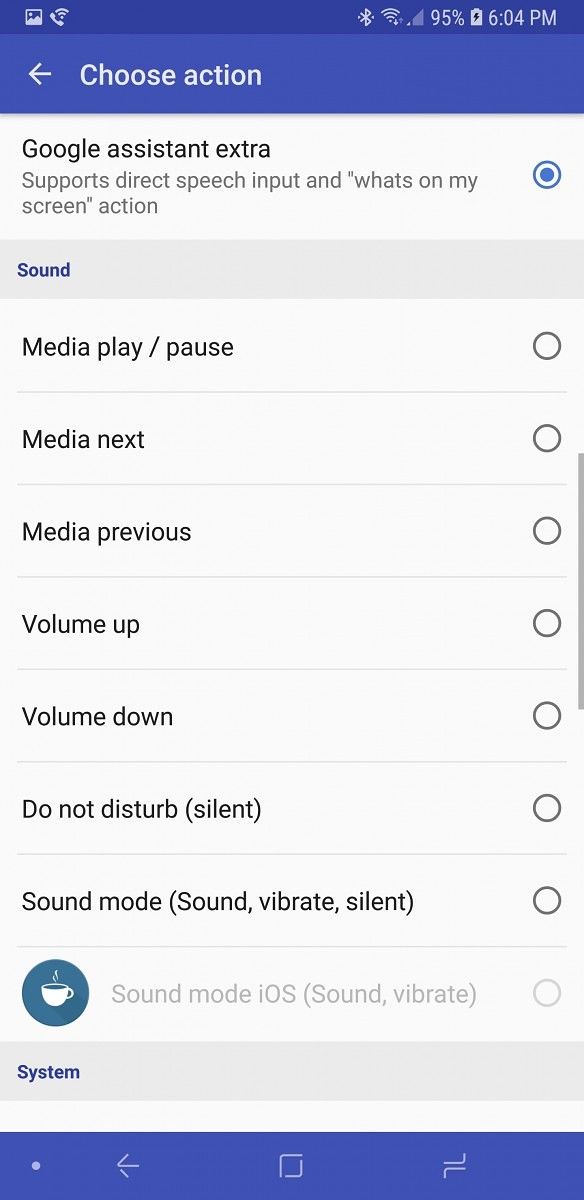
bxActions has options for both a single press and long press, along with a long press on the lock screen. The long press and long press on lock screen both require the pro mode to be unlocked for $3. You can remap the Bixby button on the Samsung Galaxy Note 9 to the actions below.

  • Disable Bixby
  • Enable Bixby
  • Home
  • Back
  • Phone (dialer)
  • Camera
  • Launch application
  • Launch shortcut action
  • Launch Tasker task (Pro)
  • Google Now
  • Google assistant
  • Google assistant extra (supports direct speech input and "whats on my screen" action
  • Media play/pause
  • Media next
  • Volume up
  • Volume down
  • Do not disturb (silent)
  • Sound mode (Sound, vibrate, silent)
  • Sound mode iOS (Sound, vibrate) (Pro)
  • Task manager
  • Power menu
  • Notification center
  • Settings tray
  • Toggle auto rotation
  • Toggle split screen (Pro)
  • Flashlight (system)
  • Flashlight (extra power)
  • Take screenshot
  • Fullscreen on/off
  • Fullscreen for the current app
  • Cancel all and mark all notifications as read (Pro)
  • Mark as read (Pro)
  • Heads-up notifications on/off (Pro)
  • Take a screenshot with Samsung Capture (Pro and root)

In my opinion, Bixby 2.0 is not that great on the Galaxy Note 9. Luckily for us, we have amazing developers who also agree with this and work on apps to remap it to more useful features, like Google Assistant.


from xda-developers https://ift.tt/2PIF0x0
via IFTTT

New LG V40 renders show off the design from all angles

lg v40

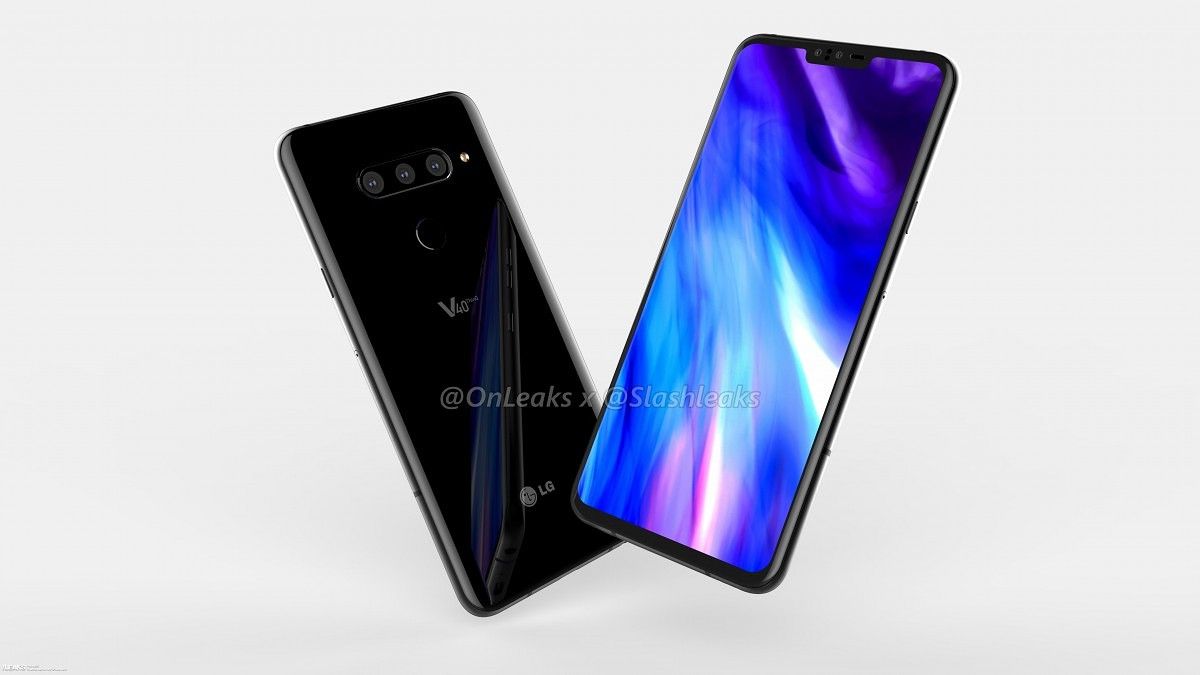
LG is expected to announce the LG V40 soon enough if the huge amount of leaks recently are any indication of anything. Not only have we gotten a sneak peak at what the device will look like, we know a large amount of the specifications it will launch with as well. The LG V40 has been pretty much blown open, and if the leaked front and back renders weren't enough for you to get a full look at the device, then you're in luck. Thanks to a leak from Slashleaks in tandem with OnLeaks, we're getting to see a full 360-degree video showing all angles of the LG V40.  What's more, a set of 5k renders have also been released as well.

The LG V40


In case you didn't trust previous renders, this is yet another leak which corroborates the fact that LG's newest flagship will feature 5 cameras. This isn't the first time we've heard of an OEM doing that, though, as Samsung is set to do the same early next year. That's three cameras on the back and two on the front. It's assumed as a result that LG is putting a lot of work into the cameras on the V40. The camera market is getting increasingly competitive as time goes on, so that's really not a surprise whatsoever. We also see the inclusion of the headphone jack, which is great given the ongoing trend of device manufacturers removing it. A USB-C port is also present, which is to be expected.

In terms of other design choices, it's noted that the LG V40 will have a 6.3-inch notched display. The notch doesn't look too intrusive in the video, but it may look worse in person. These are just CAD renders after all. The dimensions of the device come in at 158.8 x 75.8 x 7.8mm (8.2mm camera bump included). It's a good bit larger than the V30 in nearly every aspect, but that's not too bad given that it shouldn't be abnormally large. The V30 came in at 151.7 x 75.4 x 7.4mm, so it's not as if it's a whole lot smaller or anything. We'll have to wait and see how the LG V40 looks in-hand before passing any judgment on whether it's too large or not.


from xda-developers https://ift.tt/2obOvbj
via IFTTT

Google Play Games tests new leaderboard design & other UI changes

Google Play Games

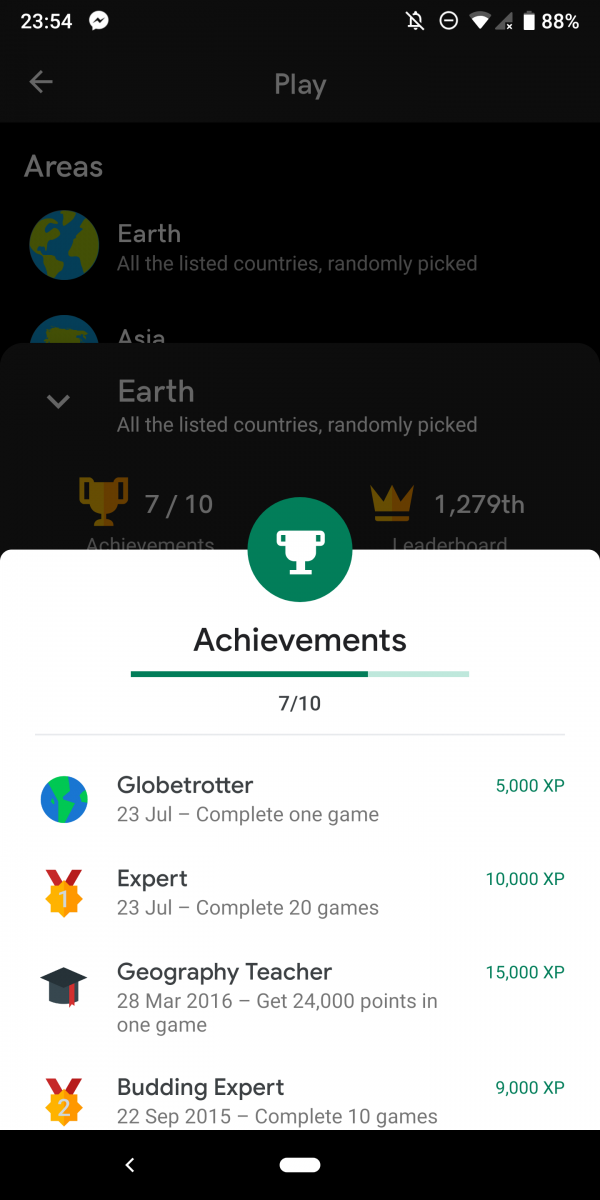
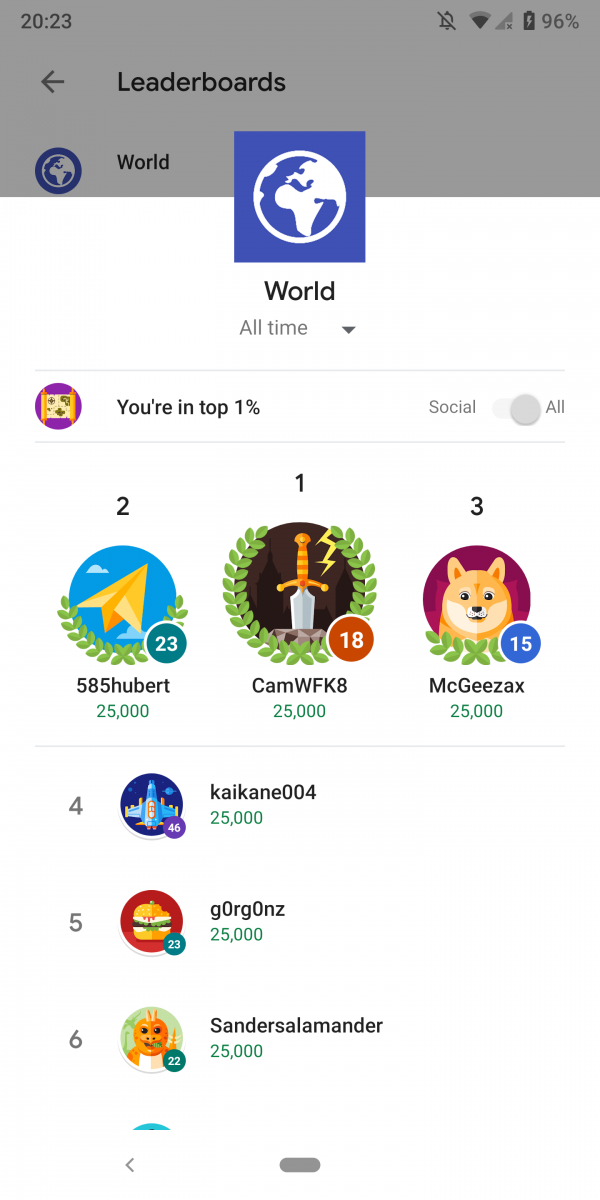
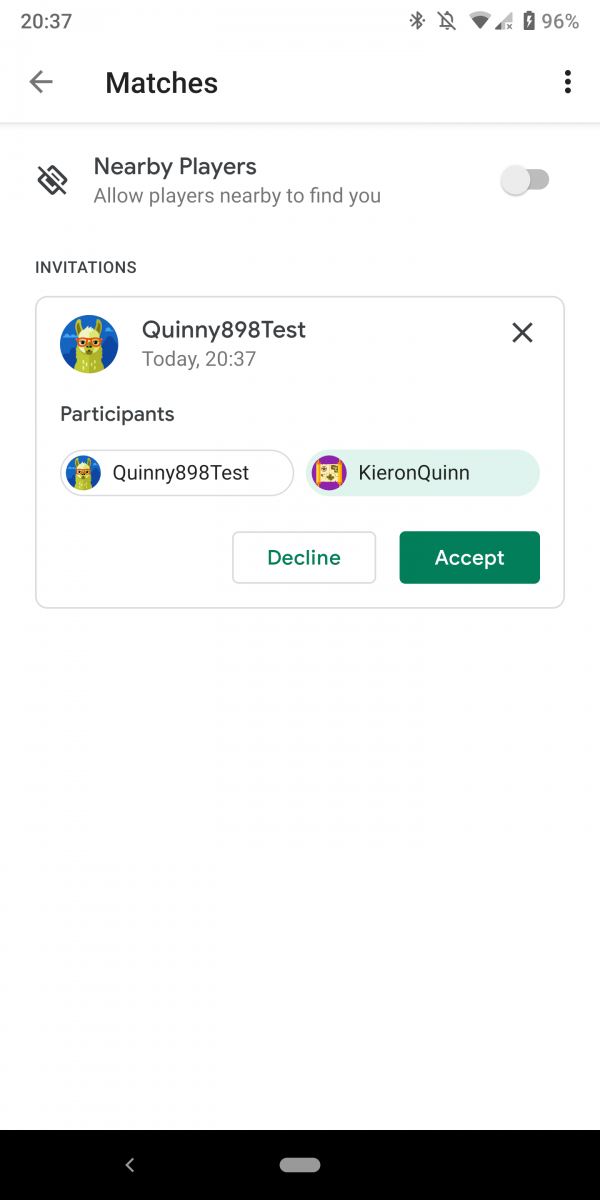
Google is testing a new user interface for the Google Play Games leaderboard and multiplayer window.  The menus are getting the new Material Theme interface that has been rolling out to apps. This adds the new light color design and updated font.

This was enabled by XDA Recognized Developer Quinny898, a.k.a. Kieron Quinn of Mighty Quinn Apps. He was able to enable this in his own game using the newest Google Play Games release. Google Play Games itself has had the new Material Theme update since November of last year. This is the first time we have seen this update in the leaderboard, multiplayer, and achievement user interface. These now all have the Material Theme UI in their respective windows.

The UI is now all white with a green accent color, this is the same as the design of the main app. This also matches the other redesigned parts of the app, which Quinny898 was able to find. This update doesn't add any new features to Google Play Games or the plugins features in games. It simply brings the app in line with Google's other redesigned apps.

Google is slowly updating most of their apps with this new interface. Android Messages has this interface. The Google Contacts, Google Phone, Google Fit, Google News, Google OneGoogle Pay, Google Home, and Google Maps apps also have this new interface. They all have been updated since Google I/O 2018 when Google announced this new design.

We are not sure when this update for Google Play Games will be officially available as Quinny898 did have to do a lot of work to get this enabled for his game. It should be soon though as the UI does look very complete.


from xda-developers https://ift.tt/2NpNsj8
via IFTTT